


Colorify: Coloring Book Maker
4.4292.00 Reviews
App Specs
- Version
- 1.0.55
- Updated On
- License
- Free
- Downloads
- 100,000+
- Developer
- Yoya Mobile
- Categories
- Photography
- Platform
- Android
Screenshots


 Analysis by AppCompare
Ever found yourself doodling aimlessly during a meeting or lecture? Well, Colorify: Coloring Book Maker might just be your new best friend. This delightful app is here to transform your idle scribbles into vibrant masterpieces, and trust me, it's more fun than trying to decipher your own handwriting.
From a photo to a page worth coloring
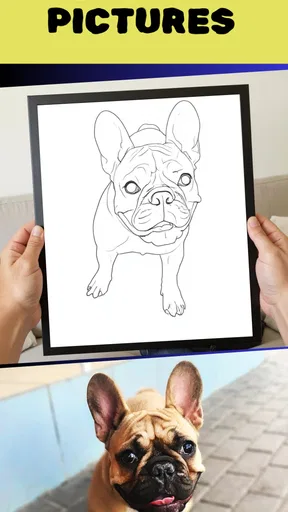
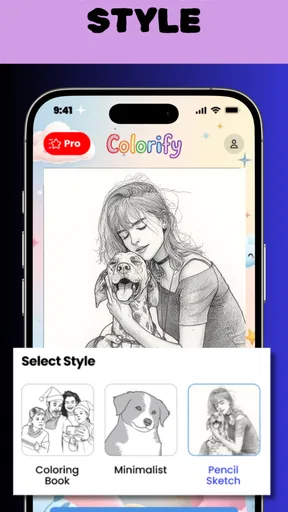
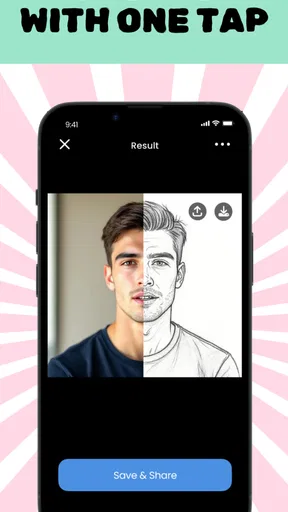
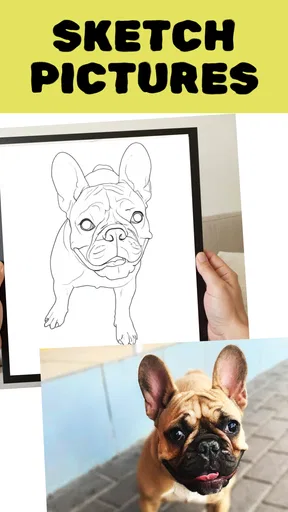
The most useful way to approach Colorify is to start with a picture you already care about: a pet curled up on the sofa, a favorite holiday snapshot, or a quick photo of a child’s drawing. Rather than beginning with a blank canvas, you bring an image into the process and let the app turn it into a coloring-page-style outline. That makes the idea easy to understand, but the source picture still matters. A clear subject against a relatively simple background is more likely to produce a page that feels readable than a crowded shot with several overlapping objects.
I’d treat the first result as a draft, not as a finished printable. Before spending time coloring, check whether the important edges are easy to distinguish and whether small details have become clutter. A face photographed in soft light, for example, may need a different source image than a sharply lit close-up. Trying a second photo of the same subject can be more effective than trying to rescue an awkward conversion by coloring over it.
A practical workflow for an everyday moment
Imagine you want a low-key activity for a rainy afternoon. You take a bright, reasonably simple photo of your dog, use Colorify to turn it into an outline, and inspect the page before handing over a device or sending it to a printer. If the dog’s fur blends into a patterned blanket, you can choose a less busy photo rather than asking a young child to color an outline that is hard to follow. This small choice at the beginning can make the final page much more enjoyable.
Once the outline is ready, the coloring stage is where the app’s creative side matters. I would begin with a few larger regions and decide on a small color scheme before filling in tiny details. For a family activity, that gives everyone a simple starting point without making the picture feel prescribed. For a more personal project, try coloring the subject in realistic shades first, then make a second version with unexpected colors. The same photo can serve as a keepsake-style picture or as a playful design, depending on the mood.
A useful trade-off is detail versus ease. Fine outlines can make a page feel intricate, but they also create more small spaces to color and may be frustrating for younger users or anyone coloring on a phone screen. A simpler source image is often the better choice when you want a quick, relaxing result. Save the busy street scene or detailed group photo for an occasion when you have time to experiment rather than expecting it to become an effortless page on the first try.
What happens when the picture leaves the app
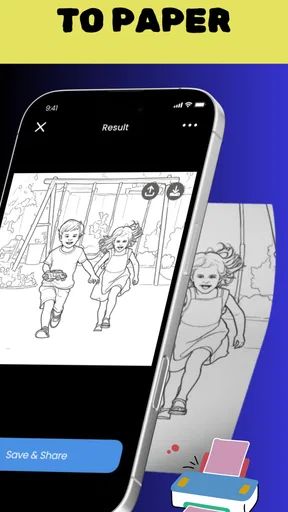
A coloring page can be used in more than one way. If you want a screen-based activity, you can keep working digitally and share the finished image with friends or on social platforms. If your plan is to print it, inspect the result at a useful size before treating it as ready for paper. Thin or crowded outlines can be difficult to color by hand, while a bold, uncomplicated subject tends to transfer more comfortably to a printed page.
Worth Reading Before You Choose

Flipboard Shows What News Apps Must Do Beyond the Feed

Switching to Android Auto Means Rethinking Your Driving Routine

Google Calendar Makes a Crowded Week Easier to Manage

Ludo King Makes the Most of the Minutes Between Plans

Baby Panda World Brings Quick Play to Modern Phones, but Its Game Library Feels Busy

ESPN’s Live Game View Makes Following Close Games Easier
That handoff is worth thinking through before you start. A picture that looks attractive on a bright phone display may feel different when viewed on paper, and a design that is easy to fill with a digital tool may not be as pleasant with crayons or markers. For a child’s activity sheet, prioritize open shapes and recognizable outlines. For a gift or personal project, a more detailed page can be part of the appeal, provided you are happy to spend longer coloring it.
Colorify sits between a conventional coloring-book app and a general photo editor. A standard coloring book offers ready-made pages and removes the work of preparing an image, so it is a better fit when you want something immediate and predictable. A photo editor gives you broader control over an image, but usually asks you to make those decisions yourself. Here, the appeal is the bridge between a personal photo and a coloring activity. That conversion is the reason to choose it, rather than expecting it to replace a full editing suite or a large library of ready-to-use pages.
Who is likely to enjoy it—and who may not
I can see Colorify working well for someone who wants to make a personal activity from familiar pictures, or for a parent looking for a home project that starts with a family photo. It may also suit adults who enjoy coloring but would rather work from their own subjects than always use generic designs. The app is in the photography category, and its central idea feels especially relevant to people who already keep favorite pictures on their phone and want to do something creative with them.
It is less compelling if you simply want a large selection of finished coloring sheets without preparing images, or if your main goal is precise photo retouching. It may also be a poor match when you need a dependable print layout for a formal project: check the page carefully and be ready to adjust your source photo or choose another tool if the outline is not clean enough. The convenience comes from turning a personal image into a starting point, not from guaranteeing that every photograph will make an equally good page.
For a shared activity, I would pick a subject everyone recognizes and agree on a simple theme before coloring—perhaps natural colors for a familiar portrait, or a deliberately unusual palette for a more playful result. That avoids the common problem of spending more time deciding what to do than actually enjoying the activity. If the result is meant for someone else, choosing a photo connected to a shared memory can make the page feel more personal than a generic template.
Getting Started with Colorify
Diving into Colorify is like opening a box of crayons you never knew you needed. The app is available on both Android and iOS, making it accessible no matter your device allegiance. Installing it is a breeze, and before you know it, you'll be greeted by a user-friendly interface that feels like a cozy art studio.
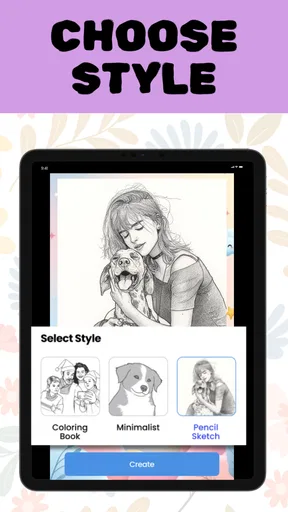
Once you're in, you'll find a plethora of coloring pages to choose from. Whether you're into mandalas, animals, or intricate patterns, Colorify has something for everyone. And if you're feeling particularly creative, you can even design your own pages. It's like having a personal art gallery right in your pocket.
The Art of Coloring
So, what's it like to actually use the app? In short, it's incredibly satisfying. The app offers a wide range of colors and tools, allowing you to experiment and let your creativity run wild. The color palette is rich and diverse, with options to adjust hues and saturation to your liking. It feels like having a virtual paintbrush that never runs out of ink.
One of the standout features is the ability to zoom in on intricate details. This attention to detail ensures that even the most meticulous of artists can find satisfaction in coloring every nook and cranny. Plus, the app is intuitive enough that even a newbie can create something they’re proud of.
Sharing and Social Features
Now, what's the point of creating art if you can't show it off, right? Colorify lets you share your masterpieces with friends or on social media platforms with just a few taps. The app also has a community feature where you can see what other users are creating. It's like a digital art exhibit that’s constantly evolving. Interacting with fellow color enthusiasts adds a social element that makes the experience even more engaging.
Sharing is most useful after you have decided what you want the image to do. A finished digital piece can be sent to a friend as a quick surprise, while a page intended for printing benefits from a final check for legibility first. I would also think about the audience before posting a personal photo-based design publicly. A family keepsake can be shared directly with the people involved rather than treated like a general social post.
Customization and Creativity
One of the things I love about Colorify is its customizability. Not only can you choose from pre-made templates, but the app also gives you the freedom to create your own designs. This feature is perfect for those days when you need a little extra creative outlet. You can draw, color, and even add text to your pages. It's a playground for your imagination.
To keep a custom page coherent, I’d make one decision at a time: first settle on the image or design, then choose whether the words are meant to label, personalize, or decorate it. Text can add context to a page made for a birthday or a family activity, but it can also compete with a detailed picture. Leaving more open space around the main subject usually makes the design easier to color and keeps any added wording readable.
Relaxation and Mindfulness
Beyond just being an art app, Colorify offers a therapeutic experience. Coloring has been shown to reduce stress and increase mindfulness, making this app not only a creative outlet but also a tool for relaxation. Whether you’re winding down after a long day or taking a quick mental health break, Colorify is there to help you find your zen.
With its soothing background music and easy-to-use interface, the app provides a calming environment that encourages relaxation. It’s more than just a coloring book; it's a digital escape from the hustle and bustle of daily life.
For a short break, I’d choose one uncomplicated page and work on it without trying to finish the whole thing. If a design has many tiny sections, it can turn a calming activity into a task; switching to a simpler picture is a better response than forcing yourself through every detail. The app can make coloring convenient, but the relaxing part still depends on choosing a pace and image that suit you.
Cost, expectations, and fit
Colorify is free to download, with in-app purchases priced from $6.99 to $34.99 per item. I’d explore the basic workflow before paying for anything, so you can judge whether turning your own pictures into coloring pages is something you will actually use. The app’s rating averages 4.7 from around 7,600 ratings, and it has over 100,000 installs; that can offer a broad sense of how people respond, but your experience will still depend on the photos and workflow you bring to it.
Yoya Mobile develops the app, which is rated for Everyone. It was released on October 16, 2025, and version 1.0.23 requires Android 7.0 or later. Those details make it easier to check whether it fits your device and household before you build an activity around it. I would still treat the photo-to-outline step as something to test with a sample image first, especially if you have a specific printable result in mind.
Final Thoughts
So, should you download Colorify: Coloring Book Maker? Absolutely! Whether you're an art aficionado or just looking for a new way to unwind, this app offers something for everyone. It's a versatile tool that combines creativity, relaxation, and social interaction in a seamless package.
Colorify is more than just an app; it's a gateway to endless creativity and tranquility. So, go ahead, give it a try, and let your inner artist shine. And who knows? You might just discover a new hobby that brings a splash of color into your life.
Pros
- Intuitive interface for easy use.
- Wide variety of coloring tools available.
- Regular updates with new features.
- Offline mode for uninterrupted creativity.
- Customizable palettes for personalization.
Cons
- Occasional ads can disrupt experience.
- Limited free templates; premium needed.
- Some features require in-app purchases.
- Performance issues on older devices.
- No social sharing integration.
FAQs for Colorify: Coloring Book Maker
What features does Colorify: Coloring Book Maker offer?
Colorify: Coloring Book Maker provides a wide range of features, including a vast library of images to color, an intuitive interface for creating your own coloring pages, and a variety of tools like brushes and color palettes. It also supports saving and sharing your artwork, making it easy to showcase your creativity.
Is Colorify: Coloring Book Maker suitable for all age groups?
Yes, Colorify: Coloring Book Maker is designed to be user-friendly and suitable for all ages. The app includes simple designs for children as well as intricate patterns for adults. Its versatility makes it a great option for anyone looking to enjoy a relaxing coloring experience.
Does Colorify: Coloring Book Maker require an internet connection?
While an internet connection is needed to download the app and access new content updates, most of the core features, such as coloring and creating, can be used offline. This makes Colorify convenient for use in places without a stable internet connection.
Are there any in-app purchases or ads in Colorify: Coloring Book Maker?
Colorify: Coloring Book Maker offers a free version with ads and optional in-app purchases. Users can opt for a premium version to remove ads and unlock additional features, such as exclusive coloring pages and advanced tools, enhancing the overall experience.
How can I share my artwork created in Colorify: Coloring Book Maker?
Sharing your artwork is simple with Colorify. The app allows you to save your creations to your device and share them directly via social media or messaging apps. This feature helps you connect with friends and family, showcasing your artistic skills easily.


